
Frequently Asked Questions about Meshtastic
What is Meshastic?
Meshtastic is a Mesh network based upon the long-range radio standard LoRa. As a mesh network every device by default, functions as infrastructure, message sender, and message recipient at the same time. It also provides specialized roles which make nodes set with them act like dedicated infrastructure. Since every device sends, receives, and routes messages, even if a device moves or looses power and stops communicating, messages will be delivered via other routes through other nodes. This make Meshtastic as well as other mesh networks suitable for use in highly changeable environments.
Why do I need a separate device to use Meshtastic?
Meshtastic is focused on delivering long-range communication with very low power consumption. So it unlike the mobile network which uses versions of Frequency Shift Key (FSK) modulation to send data over radio waves, Meshtastic uses LoRa which is a form of Chirp Spread Spectrum modulation (CSS). As of now, mobile phones do not contain modems which can decode LoRa messages, so we must use a separate radio when using meshastic.
How does Meshtastic Route Messages?
Meshtastic's routing is based off flooding. The basic process starts when a device broadcasts a message. For simplicity lets say it is a public message for everyone to receive. Every device in range of the sender will receive the message, these devices will wait for a period known as the contention window. If a repeat of the message is heard by the device within this window, they will skip rebroadcasting it. Once the window is over, the device will repeat the message to every node in their range. This will continue until all devices have received the message. In private channel and direct messages, the same process occurs except the message is encrypted with a public key specific to the recepient(s). The message is flooded until it gets to the recipient(s). In the case of a direct message, when then recipient receives the message, the recipient will send back a acknowledgement which will stop the flooding.
The contention window has three main levels, Normal which is set by default on most roles, Early which ROUTERs and REPEATERs use, and Late, which is used by ROUTER_LATE nodes. This allows devices using early to repeat the message using their better connection before every other device. This causes other devices that were going to repeat the message to skip. This saves network bandwidth.

What data can I send with Meshtastic?
Meshtastic is solely for text messaging, for messages a couple of hundred characters long. You can send any unicode character. These include:


Emojis, All scripts, and various symbols.
What kind of devices are there to choose?
The following are some of the devices we would recommend depending on your use case.

This is a Seeed Sensecap T1000e. It is perfect for people that want to carry around a Meshtastic device incase an emergency arises. This is the best device for most people.
This is a Seeed SenseCAP Solar Node P1. It is meant to be used as a fixed home node or a router. If your family has many T1000e, setting up one of these outside your home may improve your connection to the rest of the network.

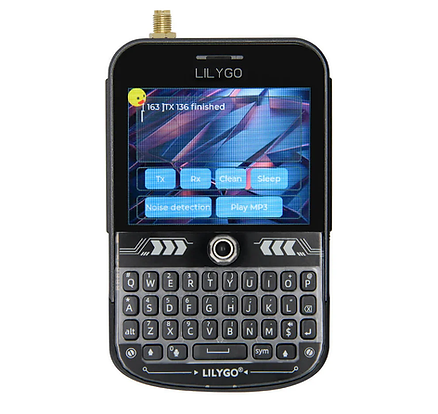
This is a LilyGo T-Deck. Unlike the previously mentioned devices it doesn't need your phone to work. This device is for people that don't want to depend on a mobile phone for emergency communication and are willing to have a large device with them.
This is a LilyGo T-Echo. It is a good middle ground between the T1000e and the T-Deck. It takes up less space than a T-Deck but has a better antenna than the T1000e. If you often go hiking and want to device to help keep you connected with the rest of your group, this is a good choice.

Why do I need a separate device to use Meshtastic?
Meshtastic is focused on delivering long-range communication with very low power consumption. So it unlike the mobile network which uses versions of Frequency Shift Key (FSK) modulation to send data over radio waves, Meshtastic uses LoRa which is a form of Chirp Spread Spectrum modulation (CSS). As of now, mobile phones do not contain modems which can decode LoRa messages, so we must use a separate radio when using meshastic.
Why do I need a separate device to use Meshtastic?
How do I send and recieve messages?
With exception to devices like the LilyGo T-Deck, most Meshtastic devices require you to have an app on your phone and connect to your phone via bluetooth. When your Meshtastic device is powered on and connected via bluetooth to a phone which has the Meshtastic app installed you will be able to: send and recieve messages, visualize the network on a map, change your Meshtastic device's settings.
However, just like your car radio, while your meshtastic device is turned off you will not be able to receive messages after you turn the device back on. Further, in the situation where your Meshtastic device is on and receiving messages, and your phone is not conneced via bluetooth, when you reconnect you may only get the most recent messages.
For this reason it is a good idea to have a node at home with a device (like a cheap android table) always powered and connected to it, so that you never miss a message.
What are roles? What should I be using?
Roles determine what a device does with a message when it recieves it. Here are a few of the most common and when you should use them.
CLIENT: This is the default role, it will lets you send and recieve messages as well a repeat other messages. This should be used on portable personal devices in small to moderately dense networks and fixed devices at home.


CLIENT_MUTE: This is a modified version of CLIENT that will let you send and recieve messages but won't repeat other messages. This was created to manage the over repeating of messages in dense networks. It should be used on personal portable nodes that are in dense networks.
Meshtastic is focused on delivering long-range communication with very low power consumption. So it unlike the mobile network which uses versions of Frequency Shift Key (FSK) modulation to send data over radio waves, Meshtastic uses LoRa which is a form of Chirp Spread Spectrum modulation (CSS). As of now, mobile phones do not contain modems which can decode LoRa messages, so we must use a separate radio when using meshastic.
Why do I need a separate device to use Meshtastic?
Meshtastic is focused on delivering long-range communication with very low power consumption. So it unlike the mobile network which uses versions of Frequency Shift Key (FSK) modulation to send data over radio waves, Meshtastic uses LoRa which is a form of Chirp Spread Spectrum modulation (CSS). As of now, mobile phones do not contain modems which can decode LoRa messages, so we must use a separate radio when using meshastic.
Why do I need a separate device to use Meshtastic?
Meshtastic is focused on delivering long-range communication with very low power consumption. So it unlike the mobile network which uses versions of Frequency Shift Key (FSK) modulation to send data over radio waves, Meshtastic uses LoRa which is a form of Chirp Spread Spectrum modulation (CSS). As of now, mobile phones do not contain modems which can decode LoRa messages, so we must use a separate radio when using meshastic.
CLIENT_BASE: This is another modified version of CLIENT. In addition to the default behaviour, when it recieves a message from or going to one of its favourite devices, it will not count as a hop. This will allow you to receive messages from further away. This is meant to be used on fixed home nodes .

ROUTER and REPEATER:
These roles perform the same important role. When properly placed they can greatly shorten the number of hops a message takes which reduces the traffic caused by the repeating of messages. When they get a message, they repeat it very quickly. If a CLIENT hasn't repeated the same message, but hears the repeat from a ROUTER, then it will skip repeating the message. If placed in position that has a good view of a lot of nodes, or on the peak between two previously separate areas, it can serve its purpose. But if placed without consideration at home, it may stop messages from leaving the area in view of the ROUTER. So please do not place a router unless you have considered the position thoroughly and know it will benefit the network. ROUTERs and REPEATERs can not be used for messaging, and can not receive messages.

ROUTER_LATE:
This is a version of the router made for situations where the place you are placing the node could improve the reliability of the network by receiving messages. But the device's location could also harm the network as previously mentioned. ROUTER_LATE repeats messages after everyone else has. This means it lets the networks normal routing happen first. However, if it doesn't hear a message being repeated for a while, it will broadcast the repeat. ROUTER_LATE nodes should be placed in high places like ROUTERs with very good view of other nodes. If you put it in a area that doesn't need one, the device will be useless.
What if I want to create a separate network?
Those ambitious and with more technical expertise may want to create a separate Meshtastic network, running in parallel with that of the existing Wellington SHORT_FAST mesh.
When developing a separate network please make sure that the Frequency Override value in the LoRa settings of your new mesh's devices doesn't overlap with any existing networks. The wellington Mesh's value is 918.875MHz.
If your want to make your on private network via a separate channel on the same frequency as the Wellington Meshtastic Network please:
-
placing fixed nodes next to existing Wellington Meshtastic nodes, as they may impact signal quality for nodes of both networks.
-
Think topologically and work with the terrain when deploying. Choose fewer high altitude vantage points with broad view sheds over many nodes with less visibility. This will reduce project costs as well as reduce the amount of bandwidth used.
-
Use the Meshtastic roles strategically, thinking clearly about the bandwidth you are using.
-
Please don't add ROUTER or REPEATERS unless there is a rural area that needs coverage.
-
Even if there is a small chance your ROUTER or REPEATER may cause network disruptions, please use ROUTER_LATE. It is much safer.
-
If you are planning to create a network within a dense urban network, please use CLIENT_MUTE role on your devices. The public nodes will route even your private messages. This will reduce excessive repeating of messages.
-